1 Overview
1.1 Brief Overview
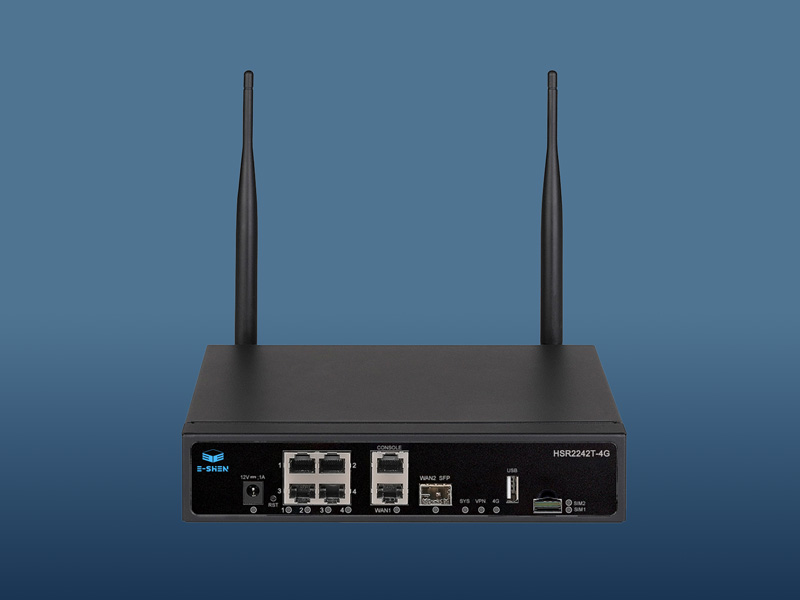
The HSR2242T-4G is a 4G LTE industrial CPE router that connects to the internet via 4G mobile communication or a 1000 Mbps WAN port, and shares the internet network through optional wireless WiFi and Gigabit LAN.
1.2 Reference Standards
Relevant standards and specifications:
USB 3.0/USB 2.0 bus standards
PCI-Express bus standard
SIM/USIM Interface Standard
IEEE802.11n/g/b/a/ac/ax
IEEE802.3/802.3u/802.ab
The 4G LTE mobile communication standard is determined by the selected 4G mobile communication module.
3 Hardware Functions
3.1 Introduction to Hardware Interfaces
internet access | There are 2 WAN ports. 1x10/100/1000 Mbps RJ45 interface, supporting (Auto MDI/MDIX) Complies with IEEE 802.3/802.3u/802(ab) 1x100/1000 Mbps SFP optical fiber interface; |
4 LAN ports, supporting 10/100/1000 Mbps (Auto MDI/MDIX) Complies with IEEE 802.3/802.3u/802(ab) The LAN port is customizable and can be switched to a WAN port. |
SIM Interface | Two self-lipping SIM card slots, QFN-8 (6mm x 5mm) Nano format, supporting both SIM and USIM cards One eSIM interface (optional) |
Power interface | DC5.5*2.1MM interface |
key | 1 restoration button |
antenna | Two omnidirectional 5dBi 2.4G antennas, external (WiFi version) |
Two omnidirectional 5dBi 5.8G antennas, external (WiFi version) |
Two external omnidirectional 5dBi 4G LTE mobile communication antennas |
3.2 Introduction to Signal Light Functions
MESH LED (WiFi version) | 1. During startup, the red light illuminates; upon completion of startup, the red light turns off and the green light turns on. 2. Press the Mesh button to enter mesh pairing mode; the green light flashes once per second, while other lights remain off. 3. The main equipment network is operational, with both the green and blue lights illuminated (blue). The device has successfully connected via MESH. For long distances, the green light is on while the red light is also on (orange). For suitable distances, both the green and blue lights are on (cyan). |
WAN1/2 LED | Always on when connected; flashes during data communication. |
LAN1 LED | The network port indicator remains lit and flashes during data communication. |
LAN2 LED | The network port indicator remains lit and flashes during data communication. |
LAN3 LED | The network port indicator remains lit and flashes during data communication. |
LAN4 LED | The network port indicator remains lit and flashes during data communication. |
4G-LTE LED | The 4G network indicator remains lit continuously; it flashes during data communication. |
VPN LED | Always on when connected; off when abnormal. |
DC source LED | Power indicator light: remains on when power supply is normal and off when power supply is abnormal. |
SIM1 LED | The SIM card indicator remains lit during insertion; it turns off when no SIM card is detected. |
SIM2 LED | The SIM card indicator remains lit during insertion; it turns off when no SIM card is detected. |
SYS LED | System status light: On when the system is operating normally; off when abnormal. |
2.3 Introduction to the Hardware Platform
processor | MT7621A/N MIPS dual-core CPU with a high clock speed of 880 MHz |
WIFI chip (WiFi edition ) | Customize WiFi 4/5/6 (300/1200/1800 Mbps) based on requirements (IEEE 802.11n/g/b/a/ac/ax) |
internal storage | DDR3 1GB |
Flash Memory | Nor Flash 256MB |
NAND Flash |
* The topology diagrams, architecture diagrams, and scenario deployment diagrams used on this page are for reference only and to meet specific needs in specific scenarios. If you need professional solutions for your actual scenario, please click "Customer Service Consultation" to submit your project requirements or consult online customer service. We will provide you with customized solutions.
* The scenario diagrams and equipment installation diagrams used on this page are for illustrative purposes only. Actual effects may vary due to individual product differences, software versions, usage conditions, installation methods, on-site environments, etc. Please refer to the actual usage.
* The data referenced on this page may vary depending on the actual on-site environment or equipment. The technical comparisons mentioned on the above page are for scientific explanation only and do not involve other purposes.
* There may be multiple versions of the same model of product. Product images and videos on this page are for illustrative purposes only. The actual product may differ slightly. Please refer to the actual product.
* Due to real-time changes in product versions, batches, and production supply factors, E-SHEN may adjust the text descriptions, images, and video effects on this page in real time to provide the most accurate product information, functional parameters, and appearance details to ensure consistency with the actual product. We regret that we will not provide specific notification if such modifications and adjustments are necessary. *Due to factors such as measurement environment and methods, product dimensions and parameters may contain some scientific errors.
*Within the scope permitted by law, product warranty policies may be updated from time to time depending on product category and market fluctuations. Please consult pre-sales customer service for specific warranty information. To protect your legal rights, please purchase products through officially authorized E-SHEN channels to avoid warranty service issues.
4 Introduction to the Hardware watchdog function
This hardware product incorporates a hardware watchdog function. Upon power-on, the watchdog automatically activates; if the routing system experiences an internal failure (e.g., crash), it shuts down for 15 seconds before restarting the entire system. When the routing system operates normally but the 4G module encounters dialing issues, it controls the 4G module's power supply via GPIO to trigger an automatic reboot, thereby resolving the dialing anomaly.
Specific functions of the hardware watchdog |
Route system exception | Module dialing error |
Restart the entire system | Only restart the module |
5 4G mobile communication features
This product features a built-in Mini PCIe interface for expanding 4G mobile communication capabilities. The integrated PCIe interface supports both USB 3.0 and USB 2.0 buses. Different 4G module models support various national 4G frequency bands; for detailed 4G specifications, please contact our customer service or refer to the 4G module datasheet.
5.1 Technical Specifications of the 4G Module
This product module employs a series of LTE Cat.4 modules specifically designed for IoT and M2M industrial applications. It supports maximum downlink speeds of 150 Mbps and uplink speeds of 50 Mbps, while its architecture is compatible with multi-vendor 4G modules and UMTS/HSPA+ UC200T series modules, enabling seamless switching between 3G and 4G networks.
5.1.1 Supported Frequency Bands
The supported frequency bands ensure coverage across different countries and regions.
Band Information | (China/India) |
LTE-FDD: | B1/B3/B5/B8 |
LTE-TDD: | B34/B38/B39/B40/B41 |
WCDMA: | B1/B5/B8 |
GSM/EDGE: | B3/B8 |
Band Information | EC200T-EU (Europe) |
LTE-FDD: | B1/B3/B7/B8/B20/B28 |
LTE-TDD: | B38/B40/B41 |
WCDMA: | B1/B8 |
GSM/EDGE: | B3/B8 |
Band Information | (Latin America/Australia/New Zealand) |
LTE-FDD: | B1/B2/B3/B4/B5/B7/B8/B28/B66 |
LTE-TDD: | B40 |
WCDMA: | B1/B2/B4/B5/B8 |
GSM/EDGE: | B2/B3/B5/B8 |
5.1.2 Rate
Data Rates(Max) | LTE-FDD | LTE-TDD | DC-HSPA+ | WCDMA | EDGE | GPRS |
Downlink: | 150Mbps | 130Mbps | 21Mbps | 384Kbps | 236.8Kbps | 85.6Kbps |
Uplink: | 50Mbps | 30Mbps | 5.76Mbps | 384Kbps | 236.8Kbps | 85.6Kbps |
5.1.3 Certification
операторы из разных регионов должны соответствовать местным требованиям сертификации операторов.
5G NR: | n41/n78/n79/n1/n28/n77 |
LTE FDD: | B1/B2/B3/B5/B7/B8/B20/B28 |
LTE TDD: | B34/B38/B39/B40/B41 |
WCDMA: | B1/B5/B8 |
The above frequency band information is for reference only; specific frequency bands shall follow the requirements of your local carrier.
5.1.4 Other Characteristics
(U) SIM card detection (optional)
Power supply voltage: 3.4–4.5 V, typically 3.8 V
Operating temperature: -35°C to +70°C
6 Power Supply and Power Consumption Description
| test condition | least value | Rated value | crest value | unit |
working voltage | T A = 25°C | 9 | 12 | 35 | V |
Absolute operating voltage | T A = 25°C | 8 |
| 36 | V |
Working Current | VIN=12V,T A = 25°C | 0.3 | 0.9 | 1.5 | A |
Use a certified power adapter to power this product. If an un certified power source is used, strictly adhere to the specified power parameters; otherwise, the product may be damaged. When using batteries or a vehicle power supply, implement proper anti-static and surge protection measures.
5. Introduction to 5G Wi-Fi wireless parameters
7.1 WIFI EVM Metrics (WiFi Version)
| mode declaration | Indicator Parameter | unit |
EVM metric | 802.11B 11Mbps | ≤ -1 5 dB | dBm |
802.11G 54 Mbps | ≤ -25 dB | dBm |
802.11N HT20@ MCS7 | ≤ -28 dB | dBm |
802.11N HT40@ MCS7 | ≤ -28 dB | dBm |
802.11AC VHT20@ MCS8 | ≤ -30 dB | dBm |
802.11AC VHT40@ MCS9 | ≤ -32 dB | dBm |
802.11AC VHT80@ MCS9 | ≤ -32 dB | dBm |
802.11AX HE20@MCS 11 | ≤ -35 dB | dBm |
802.11AX HE40@MCS 11 | ≤ -35 dB | dBm |
802.11AX HE80@MCS 11 | ≤ -35dB | dBm |
7.2 WIFI 2.4G (WiFi version)
Compatible with IEEE 802.11 b/g/n/ac/ax standards, supporting 20 MHz and 40 MHz bandwidths with modulation schemes including 1024-QAM and OFDMA. Utilizing 2T2R MU-MIMO antenna technology, it achieves a maximum connection speed of up to 573.5 Mbps. Below are specifications for the 2.4 GHz Wi-Fi frequency band, including operating frequency, reception sensitivity, and transmission power.
| explain | crest value | Rated value | least value | unit |
service frequency |
| 2484 |
| 2412 | MHz |
receiving sensitivity | 802.11B 11Mbps | -86 | -87 | -88 | dBm |
802.11G 54 Mbps | -69 | -71 | -73 | dBm |
802.11N HT20@ MCS7 | -67 | -69 | -71 | dBm |
802.11N HT40@ MCS7 | -65 | -67 | -69 | dBm |
802.11AC VHT20@ MCS8 | -63 | -65 | -67 | dBm |
802.11AC VHT40@ MCS9 | -61 | -63 | -65 | dBm |
802.11AX HE20@MCS11 | -62 | -64 | -66 | dBm |
802.11AX HE40@MCS11 | -60 | -62 | -64 | dBm |
transmitting power | 802.11B 11Mbps | 22 | 21 | 20 | dBm |
802.11G 54 Mbps | 20 | 19 | 18 | dBm |
802.11N HT20@ MCS7 | 19 | 18 | 17 | dBm |
802.11N HT40@ MCS7 | 19 | 18 | 17 | dBm |
802.11AC VHT20@ MCS8 | 18 | 17 | 16 | dBm |
802.11AC VHT40@ MCS9 | 18 | 17 | 16 | dBm |
802.11AX HE20@MCS11 | 17 | 16 | 15 | dBm |
802.11AX HE40@MCS11 | 17 | 16 | 15 | dBm |
7.3 WIFI 5.8G (WiFi version)
Compatible with IEEE 802.11 a/ac/ax standards, supporting 20MHz, 40MHz, and 80MHz bandwidths with modulation schemes including 1024-QAM and OFDMA. Utilizing 2T2R MU-MIMO antenna technology, it achieves a maximum connection speed of up to 1201 Mbps. Below are specifications for the 5.8 GHz Wi-Fi frequency band, including operating frequency, reception sensitivity, and transmission power.
| explain | crest value | Rated value | least value | unit |
service frequency |
| 5825 |
| 5180 | MHz |
receiving sensitivity | 802.11G 54 Mbps | -69 | -71 | -73 | dBm |
802.11N HT20@ MCS7 | -67 | -69 | -71 | dBm |
802.11N HT40@ MCS7 | -65 | -67 | -69 | dBm |
802.11AC VHT20@ MCS8 | -63 | -65 | -67 | dBm |
802.11AC VHT40@ MCS9 | -61 | -63 | -65 | dBm |
802.11AC VHT80@ MCS9 | -59 | -61 | -63 | dBm |
802.11AX HE20@MCS 11 | -57 | -59 | -61 | dBm |
802.11AX HE40@MCS 11 | -55 | -57 | -59 | dBm |
802.11AX HE80@MCS 11 | -53 | -55 | -57 | dBm |
transmitting power | 802.11G 54 Mbps | 20 | 19 | 18 | dBm |
802.11N HT20@ MCS7 | 19 | 18 | 17 | dBm |
802.11N HT40@ MCS7 | 18 | 17 | 16 | dBm |
802.11AC VHT20@ MCS8 | 18 | 17 | 16 | dBm |
802.11AC VHT40@ MCS9 | 17 | 16 | 15 | dBm |
802.11AC VHT80@ MCS9 | 16 | 15 | 14 | dBm |
802.11AX HE20@MCS 11 | 18 | 17 | 16 | dBm |
802.11AX HE40@MCS 11 | 17 | 16 | 15 | dBm |
802.11AX HE80@MCS 11 | 16 | 15 | 14 | dBm |
8 Introduction to Structural Parameters and Accessories
weight (KG) | TBD |
Shell size | L*W*H = 200mm × 130mm × 44mm (excluding hanging ears) |
colour matching | black |
fittings of a machine | Power Adapter | 12V/2A 1PCS |
instructions | 1PCS |
certificate | 1PCS |
Ethernet cable | 8P8C network cable 1 PCS |
9 Product Operating Environment Requirements
working temperature | 0°C to 45°C |
Storage Temperature | -40°C to 70°C |
Working humidity | No coagulation occurs at relative humidity (RH) ranging from 10% to 90%. |
Storage humidity | No coagulation occurs at relative humidity (RH) ranging from 5% to 90%. |
10 Software Configuration Information
give tacit consent to IP | 192.168.1.1 |
Username/Password | root/admin |
2.4G SSID | WIFI6-XXXXXX (where X represents the last 6 bits of the MAC address), with no default password |
5.8G SSID | WIFI6-5G-XXXXXX (where X represents the last 6 digits of the MAC address), with no default password |
The above outlines the product's standard default configuration. The WIFI SSID may vary when using our company's system firmware or OPENWRT firmware, but the default IP address, web login username, and password remain unchanged. For detailed software features, refer to the product manual. Customization requirements shall follow the specified parameters.
There is no further information at the moment. If you have any questions, please contact our online customer service.